Articles by "Gallery"
Showing posts with label Gallery. Show all posts

Water Festival and Racing Boad Battambang 2022

From the 9th -10th of October 2022 is the #waterfestival and #Boadracing in Battambang province. In this video, you will enjoy with beautiful and very enjoyable the Festival of 2022 in Battambang. Let's see the amazing review. Let's enjoy my travel vlogs and lots of experiences about travel in the countryside, downtown and mountain view in Cambodia and nearby countries. If you enjoyed it, please hit subscribe button and the bell icon.

See the Full view of the Battambang Water Festival Ceremony 2022 below:


Web Banner Design Tutorials

Today I'm going to show you the #banner design for the website in #AdobeIllustrator Please click on Subscribe, Like, and Share my content. I will commit to producing more learning techniques and my vlogs. Find me in social networks: ►Facebook: https://web.facebook.com/lonboreyOfficial/ ►Twitter: https://www.linkedin.com/in/lonborey/ ►LinkedIn: https://twitter.com/lon_borey/ ►Instagram: https://www.instagram.com/lonborey/ ►Website: https://www.ultra168.blogspot.com/ Stay in touch with us by subscribing and clicking on the bell icon to get more latest videos. Thank you for watching!

Download Source: Web Banner Design


How to create Text Bound Effect in Adobe After Effect 

Hey everyone! today I will show the text bound effect like this.
Before starting, please subscribe to my channel. 

You can download this Ae file at the link in the descriptions below.

Create a new composition and name it 'Text Bound Effect', you can you any name you want.
Set preset to 1920 pixels by 1080 pixels with the 30 frame per second and set during to 5 seconds then click OK.

Select Text Tool and type the word you want, in these tutorials I you mine.  
Align the text to the center of the composition.

Select the Text layer and expand it and select Add Animate icon then select Position.
Remove the Range Select 1 as we don't need it in this tutorial.

Select Animator 1 then select Add and choose Selector then select Wiggly. Add one more property by clicking Add icon and selecting Position. On position, go to the first frame and add value 800 to it and add keyframe then move to 2 seconds and change the value to 0.

Go to Wiggly Selector 1 and add the keyframe to Max amount and Min Amount at the starting frame. Then go to 2 seconds and put change its value to 0. Change the Wiggly Second to 3. Select all keyframes and add easy ease to it. 

Perfect! Now let's add effect to it. Go to Effect and Presets and search for Echo Effect. Then apply it to the text layer. Change Echo value to 0.001 and Number of Echoes to 50. 

Now add another effect, go to Effects and Presets, search Fill Effect, and apply it to the layer. You can use any color you want. Good!, now add one more effect. Go to Effect and Presets again and search CC Composite Effect and apply it to the layer. It looks good to me. 

To make it more beautiful, let's add one more effect. Go to effects and presets and search Simple Choker effect and apply it. Set Choke Matte to 0.50. Great!

Now let's duplicate the text layer by pressing control + D and changing the fill color you want then move the first layer to 0.50 seconds. It looks good to me. 

Select all layers and create a pre-compose. Create a new composition and name it Final. Set duration to 10 seconds then presses OK.

Go to the Project panel and track Pre-comp to the Final composition and rename it In Effect and duplicate it and rename it to Out Effect. Move Out the Effect layer to the End of the composition. Right Click on the and select Time then select time reverse layer.

Great!


Download the source file from here: Text Bound Effect


Hey everyone! Today I'm going to show you how to create the lower third like this.
Before starting, please subscribe to my channel. Let's get started…

Open Adobe After Effect and create a new composition and name it 'Main Comp' and set the custom preset to 1920 pixels by 1080 pixels and 60 frames per second.
Set duration to 5 seconds and click OK.

I going to use the Rectangle tool, select the fill color, set it to the solid color, and filled with white color. Click on Stroke and set it to none.
Draw a rectangle shape like this. Take an angle point to the center of the shape. Align the shape to the center of the composition.

On the shape layer, select contents, select Rectangle 1, and then expend Rectangle Path 1 unlink the size of the shape and resize it to width by 1200 pixels and heigh to 200 pixels.
On transform Rectangle 1, select Skew and put value 35 to it. 

Now Rename the shape layer to 'Shape 1'. Duplication the shape layer but press Control + D and select Shape 2 and go to the rectangle tool to change the color to red color. You can pick up any color which you want.
Expand shape 2, expand Rectangle 1, expand rectangle path 1, and set width value to 250 and high to 200.

Select shape 2 and press S to change the scale of the shape and Set the value to 115.

Now import the social media logo, in this tutorial I will use the YouTube logo. After import select and create a new composition and resize it to fit the composition.
Right-click on the YouTube logo and rename it to 'logo'.

Click on the main composition and track logo composition to the main composition. Press S on the keyboard to change the size fit to shape 2. 
It looks good to me. Let's animate the logo by pressing R on the keyboard to set rotation on the logo. Set the keyframe to 1 second and press the stopwatch icon on scale and Rotation.
Go to the starting point of the frame and set the value to scale to 0 and rotation to -100. It looks good to me. Select all keyframes and right-click and select keyframe assistant and select easy ease.
It now looks like smooth animation. 

Next, select both shape 2 layer and logo layer and pre-compose and name it to logo animation.
Let's move the time selector to 1 second and select the logo animation layer and press P for the position. 
Move the logo layer to the right and create a keyframe. Move to 3 seconds and create another keyframe and set the value to 540. 
Great! 

Now let's animate the rectangle as well. Open shape 1 and open rectangle 1 and on transform rectangle 1 select Scale and unlink its value. Move the angle point to the center right of the shape and set a keyframe on it. Select it and change it to easy ease. It looks good to me. 

I going to use stroke animation by duplicating the shape 1. Select the shape 1 and rename it to stroke. Press U on the keyboard and delete the keyframe on it.
Add new Trim Paths to it. Select Trim Paths and select stroke shape and click on the isolated icon.  Select Rectangle Tool and select fill and set it to none. 
On Stroke set the color to white and the value to 2. 

On trim paths, set the End value to 55 and offset to -5. Let's animate it. 

Go to 4 seconds and a half, and create a keyframe on the end value. Move to 1 second and set the End value to 0. Select all keyframes and put easy ease.
All right, let's un-show the isolate icon and move to below the shape later. 

Next, let's put the text to it. Select the text tool and apply it. You can use any font you want. 

Download the File here:


Black Friday Poster Design in Illustrator CC 2021 #lbrDesign

Please click on Subscribe, Like, and Share my content. I will commit to producing more learning techniques and my vlogs.

Download Effect from here:

https://mega.nz/file/MYtRVaAB#q05reOUxzE8FmGOfZXburSR5BuSeIIKosQzTmcGR3H4

Find me in social networks: ►Facebook: https://web.facebook.com/lonboreyOfficial/ ►Twitter: https://www.linkedin.com/in/lonborey/ ►LinkedIn: https://twitter.com/lon_borey/ ►Instagram: https://www.instagram.com/lonborey/ ►Website: https://www.ultra168.blogspot.com/ Stay in touch with us by subscribe and click on the bell icon to get more latest video. Thank you for watching!


  How to Reset Screenshot Index on Windows 10

Hello, today I love to show you #How_to_Reset_Screenshot_index on Windows 10. When you take a screenshot in your PC by using Windows icon + PrtSC, you will get a screenshot in picture and it will create index number from 1 continually. But if you want to reset that index to number 0 or number 1, let follow my video. 

  1.  1- Go to RUN and type regedit 
  2. Go to this address: HKEY_CURRENT_USER\SOFTWARE\Microsoft\Windows\CurrentVersion\Explorer 
  3. 3- Double click on ScreenshotIndex and change the index number Done
Thank you so much!


Set Up Your Business Address to Google Maps

Your address is very import for your customer finding or explore your product. You can now create your own business address on Google Maps by follow the easy steps to set it. 

To get your address on Google Maps follow the step below:

  1. Register account with Google Local guild. Please go to this link https://maps.google.com/localguides/
  2. Go to Google Maps and login with local guild account 
  3. Right click on any location (your address) on Maps and select add mission place
  4. Follow and complete the require information
  5. Wait Google Team review and approve

For more detail please watch below video:


Background of Battambang Province

According to the temple inscriptions that we have and have found until today before The Angkorian period and period did not tell us which villages and districts existed at that time The one with the name Battambang. 

But we also do not dare to conclude that the name Battambang was used or not used in the era. But in the Angkorian and post-Angkorian periods, according to documents, the Khmer masses used the name Battambang district. Why call the name Battambang History written on the inscription did not answer It is known only in the legend, the story of Ta Dambang Kranhong that our Khmer Understood as a story that dates back to the Angkorian era, which explains why Let us call it Battambang or O'Dambang. As for the name Preah Dambang, King Rama I decided to call the village Sangke as Preah Dambang.

Before the Angkorian and Angkorian periods, the western and northwestern parts of the Tonle Sap Lake were The land of Amokpura and the land of Bhimapura. In the Angkorian period, the land or region of Amok Borei flourished due to the fertile soil Can grow rice and other fruits and vegetables with good yield. The Khmer people of that generation came to live in this region, as evidenced by the many ancient temples in the area.
But almost all of those ancient temples collapsed and disappeared, except for Banan, Ek Phnom, Basset, and Stung Banteay. Teay Banteay Chhmar, etc. Tens of thousands of officials and people of that generation built shrines to deities and gods. Other in Hinduism or to the Buddha and other bodhisattvas in Buddhism. 

Centuries later, the territory of Battambang province was severely affected by aggression. Cups from the Siamese from the 15th - 16th - 17th - 18th centuries have made the lives of the people That generation of Battambang fell into poverty, ruined families, lost property, and tragedy. . Tra Battambang province under Thai rule.  

At the end of the 18th and early 20th centuries, Battambang province fell under Siamese oppression. For more than a century, ruled by the Ben family, it was later renamed the "Immune Family". Six links until 1907.

According to the Franco-Siamese Treaty of March 23, 1907, Siam returned to Cambodia the territory it had occupied. More than a century, that is Battambang, Siem Reap, Angkor, Serey Sophorn and Chongkal by exchange and Trat province and Dach Se (territory Laos) Upper part of the Mekong River. A few months later, His Majesty King Sisowath issued Royal Proclamation No. 66, dated December 6, 1907. Battambang land is divided into three provinces: Battambang, Siem Reap and Serei Sophorn. In 1925, the territory of Battambang province was redistributed into Battambang province and Siem Reap province, in which Battambang province has two districts: Battambang district and Serei Sophorn district. 

 In 1940, Battambang province had 7 districts: Battambang, Sangke, Maung Russey, Mongkul Borey, Teuk Chor, Serey Sophorn and Bi districts. Gems. In May 1953, the Poipet Administrative Zone was established under Serey Sophorn District. In July 1957, Teuk Chor district was divided into two districts: Preah Net Preah and Phnom Srok. Serey Sophorn district is also divided into two districts: Serey Sophorn and Banteay Chhmar districts. March 1965 Poi administrative area. Pet, established in 1953, is classified as a district called Ochrov district. In July 1965, part of Mong Russey territory was cut into the Koas Kralor administrative area. In March 1966, another new district was established, Thmor Puok, located in Thmor Puok. At the same time, Banteay Chhmar district was removed from Battambang province to be under the jurisdiction of Oddar Meanchey province, which Newly created. 
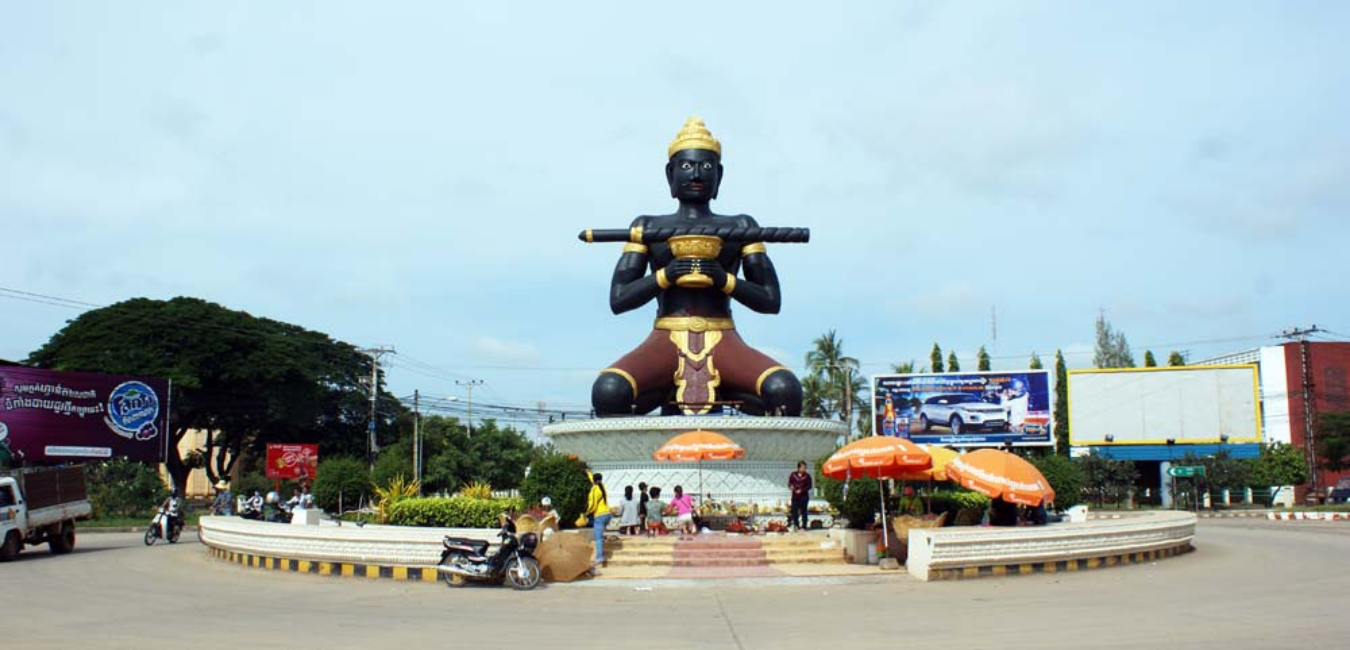

At the beginning of the Khmer Republic, two districts were formed: Banan and Koas Lor. So far, Battambang district has 9 districts: Battambang district, Sangke district, Maung Russey district, Mongkul Borey district, Serey So district. Phorn, Ochrov district, Preah Net Preah district, Banan district, Koas Lor district and 2 administrative areas: Bakprea administrative area and Figs administration. During the killing field regime of 3 years, 8 months and 20 days in Battambang province, as well as other provinces throughout the country, the people The state was evacuated, especially from urban areas to rural and mountainous areas. Battambang, once known as the country's rice barn, became a place of torture, slaughter and starvation at the time. The province did not have clear boundaries, with the then-ruling organization placing Battambang in the region. Northwest and there are 1 area, 3 areas, 4 areas and 5 areas.

At that time, some districts were also called, such as Phnom Sampov, Battambang, Mongkul Borei, Sangke, Maung Russey - District 41 - District 42, etc. Battambang Province was liberated from the genocidal regime on the 13th January 1979 The locomotive is called the People's Revolutionary Committee (province-district-town-province-commune-sangkat). Commune / Sangkat People's Committees were first elected in 1983.  

From 1989 to 1986, Battambang province had 9 districts, 1 provincial town. In 1986, three new districts were established: Banan, Bavel, and Ek Phnom. Battambang has 12 districts and 9 provincial towns: Maung Russey district, Sangke district, Banan district, Ek Phnom district, Battambang district, Rattan district. Mondul, Mongkul Borey district, Sirisophon district, Preah Net Preah district, Thmor Puok district, Phnom district, and Bavel district.  

In 1988, 5 districts were Mongkul Borei, Thmor Puok, Serey Sophorn, Preah Net Preah and Phnom Srok districts. Was cut out to form another new province, Banteay Meanchey. From then until 1993, Battambang province had 7 districts, 1 provincial town and 53 communes and sangkats. 10. After the new constitution, Battambang was renamed Svay Por district. The 10 communes have been transformed into communes, so Battambang has 8 districts and 47 communes.  

Currently, Battambang province is located in the northwest of the country, 291 km from Phnom Penh, which borders Pursat province to the east and Tonle Sap Lake to the west of Pailin province And Thailand to the north, Banteay Meanchey to the south, and Pursat to the south. To the west is a 144.8 km long border with Thailand's Chanthaburi, Trat and Sa Kaeo provinces. The province has a total area of ​​11,748 km 2, 13 districts and 1 city, 92 communes, 10 communes and 809 villages. Number of families: 263,435 families, total population: 1,205,050 people, 602,994 women. Potential labor force from 18-35 years old. 56% Annual population growth 2.3% Density 104.92 people / km2 Agricultural population Mainly 72.20%, average rainfall 960.1 mm / year, weather 13.50 ºc - 41.50 ºc. 

The province has one international border gate, the Doung checkpoint (Kamrieng district) and the other four border gates, the 13-kilometer gate (Phnom Land) in Sampov Loun district, O'Rumduol gate in Phnom Proek district, O'Anlok gate (Suon Sum) in Kamrieng district and Chhokka gate (400) in Samlot district. The situation along the Cambodian-Thai border is better cooperation and mutual information Facilitate export-import traffic, especially agricultural products in border districts. GDP in 2016, the economy of Battambang province is about 6,274,083.8 million riels, equivalent to about 1,557.6 million dollars ($ 1 exchange rate = 4028 d) at current prices in 2015. 

Compared to 2014, the provincial economy was 5,887,402.5 million riels, equivalent to 1,460.9 million US dollars. The economy grew 4.1% in 2015 compared to 2014, per capita income of $ 1,324.5 in 2015 and $ 1,258.0 in 2014.